
Tools for the Edge of the Map.
Welcome to Hawke Systems. We're here to support field engineers, consultants, and digital nomads in search of data security and personal computing infrastructure, wherever your travels take you.Our tools create secure local networks, storage, and computing environments wherever work happens, from factory floors and oil fields to research stations and expedition camps. Our first device, the Nomad pocket infrastructure node, provides a complete phone-sized mobile workstation anywhere on earth. Built by a global operator, for true global operators.

Nomad Mk I
The Nomad Mk I pocket infrastructure node is a portable phone-sized personal server that gives you your own network, storage, and secure connection anywhere in the world. This device:- Creates a private Wi-Fi network for your devices
- Automatically backs up and hosts your files on local encrypted storage
- Routes your traffic securely through whatever internet connection is availableTogether, these three capabilities turn the Nomad into a compact piece of personal digital infrastructure you can carry anywhere work takes you.
Prototype Launch Q2 2026
Commercial Launch Q1 2027 (tentative, limited run)
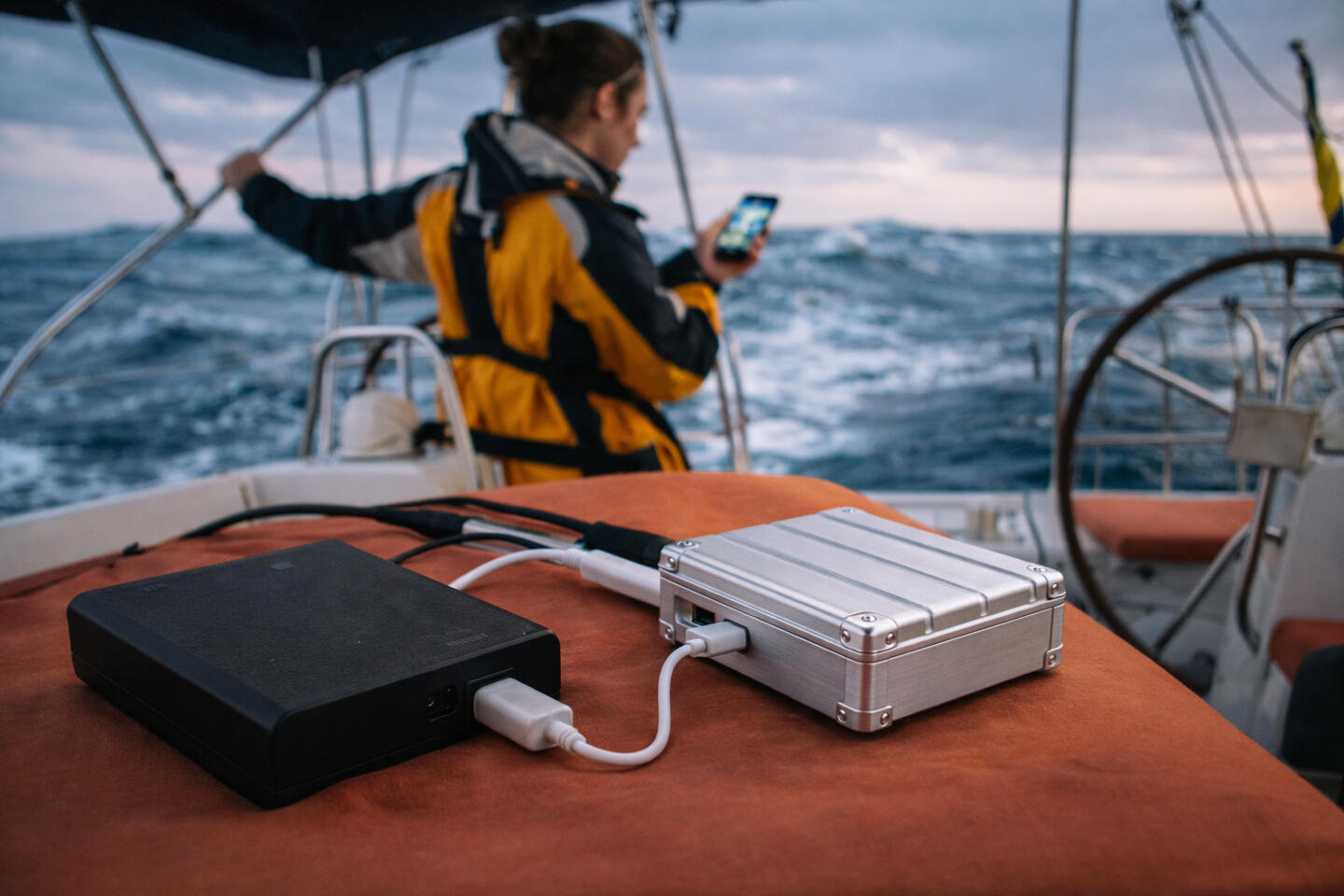
Design concept – prototype in development.
Potential future modules for the Nomad include:- Nomad Core (described above): Core unit with compute + Wi-Fi + OS
- Nomad Power: Built-in battery with pass-through charging
- Nomad Vault: 1 TB encrypted storage
- Nomad Link: Cellular modem with SIM / LTE connectivity
- Nomad Sense: Data ingestion and sensor interfaceUse Cases
Minimal Traveler: Core
Field Engineer: Core + Power
Journalist: Core + Power + Vault
Expedition Guide: Atlas (Core + Power + Vault + Link + Sense)

The Story
This all started in 2025 during the first year of an expat assignment in Hong Kong. I was crossing into China weekly and visiting suppliers in far-flung parts of Asia twice a month. At the same time, I was finishing my MBA, starting a supply chain program through MITx, writing a Substack, developing an app, and trying to stay in touch with friends around the world.Nothing outrageous, but even that moderate level of computing became a challenge when dealing with spotty hotel WiFi, inconsistent phone coverage, and varying restrictions across more than ten countries.After running into the same issues over and over again, I locked in on the Father, Son, and Holy Ghost of travel essentials: cell data, money, and electricity. I built a pretty robust travel setup with both digital and analog failsafes, but consistent connectivity and reliable data access continued to be a problem.Somehow, this class of solution just doesn’t really exist commercially.So in 2026 I decided to build my own: a pocket infrastructure node that provides a professional, reliable digital environment wherever I happen to be, whether that’s rural Mongolia, the urban jungle of Hong Kong, or the actual jungle in Vietnam.The Nomad Mk I prototype is right around the corner. If all goes well, I’ll produce a very limited run for friends and family. Stay tuned.

If we haven't connected before, I'm Neil Hawke (霍寧), based in Hong Kong, and working in global hard tech sourcing.

FAQ
When does the Nomad launch?
Prototype development is in progress. Commercial launch for the core unit is estimated for Q1 2027 with a limited "friends and family" run. Future modules as scoped out on this site will be planned for launch later on, TBD.
Why use Nomad instead of my computer/hotspot/VPN?
A laptop setup is just a device temporarily connected to other people’s infrastructure. Nomad is infrastructure you carry with you (literally in your pocket or backpack, it's phone-sized).With the usual setup, your laptop joins whatever network happens to be available, hotel Wi-Fi, café routers, airport networks, tethered phones. Even with a VPN you’re still negotiating with captive portals, unstable bandwidth, and networks you don’t control. Nomad flips this and creates your own private network, and your devices connect to it. Nomad then handles whatever upstream connection exists, Wi-Fi, ethernet, or cellular. Your laptop and phone never directly trust the random networks you encounter.There’s also a data difference. In the normal model, your files live partly on a laptop and partly in the cloud. Lose the laptop or lose connectivity and things get messy. Nomad keeps storage on a separate persistent node. Your laptop becomes a client device rather than the vault.Finally, Nomad runs continuously. A laptop only works when it’s open and powered on. Nomad is a small server that can stay running all day, handling storage, syncing, VPN tunnels, backups, and network management quietly in the background.
What do I need each module for?
Nomad Mk I (Core Unit)
Nomad Mk I is the core of the system, a portable server that creates your own private network and services wherever you are.Use Case: A consultant working from hotel rooms connects their laptop and phone to the Nomad instead of directly to hotel Wi-Fi. The Nomad handles networking, file access, and secure connections while the laptop remains just a client device.Nomad Power
Power adds an integrated battery so the system can run independently of wall power for hours.Use Case: A field engineer troubleshooting equipment at a remote industrial site can run the Nomad all day from the battery, hosting documentation, diagnostics tools, and local data storage without relying on unreliable site power.Nomad Vault
Vault adds high-capacity encrypted storage, turning the system into a portable data vault.Use Case: A journalist traveling between countries stores research files, interviews, and backups on the Vault rather than on their laptop. If the laptop is lost, replaced, or confiscated, the data infrastructure remains separate.Nomad Link
Link adds cellular connectivity, allowing the system to access the internet anywhere there is mobile coverage.Use Case: A survey team working in a rural region uses a SIM card to connect the Nomad to the internet, creating a secure Wi-Fi network for laptops and tablets even where no local network exists.Nomad Sense
Sense allows the system to collect, store, and relay data from external sensors and connected devices.Use Case: A research team running environmental sensors in a remote area connects temperature and weather sensors to the Nomad. The device logs the data locally and can transmit summaries when cellular connectivity becomes available.Nomad Atlas (Full Stack Configuration)
Atlas combines compute, power, storage, and cellular connectivity into a complete portable infrastructure node.Use Case: An expedition research team operating in a remote environment uses Atlas as their digital base station, providing local networking, secure storage, and internet connectivity for the entire team from a single device that fits in a backpack.

My Gear
This is a gear setup that I've refined over 3 years of constant global travel and working out of hotels, vans, and tents. Hopefully you can glean something from this list.Further below I list key items I love, and common failures I've experienced.[Pictures coming soon]Philosophy:
1. Prioritize power, cellular data, and access to money.
2. Remove single points of failure for these 3 priorities. Most failures are minor but can cascade. Create options (i.e. backup phone/SIM, power banks).
3. Have an analog fallback for each of these priorities (i.e. cash and passport copy).
4. Everything is USB-C. No exceptions.
5. Don't check bags.
6. Wear sunblock.
7. Carry 10 beers worth of cash if you're in a cash country. It sucks being thirsty.
Backpack Loadout

Peak Design Outdoor Backpack 25L. Peak Design small tech pouch, Miir water bottle, iPad, work or personal laptop, work phone, 2x Anker power banks, Davek mini umbrella.Small tech pouch has Anker GaN power converter, 2x Anker USB-C cables, and PRC & HK Ceptics wall adapters. I do carry a couple USB-A and Lightning adapters for friends/ emergencies.This backpack is really EDC for office and adventure days. If I don't use an item every single day, it stays in the carryon.
Carryon Loadout

Rimowa Cabin S. Peak Design ultralight packing cubes (medium, small, shoe bag), tech pouch, small wash pouch, and emergency pouch with 4 types of cash.3-4 days of clothes and trail runners go in the cubes. Tech pouch is my base camp setup- backup power (and Skross global adapter), backup phone, first aid, and laundry.Is a Rimowa needed? No. But a carryon becomes a rolling chassis for everything else and failure could ruin a week, easily. Rimowa has excellent engineering and a big support network. It's the Toyota Land Cruiser of luggage. At least in my opinion.
EDC Personal Loadout

Personal phone, sailcloth wallet, AirPods, sunglasses, watch, keys.
Everything

Items I Swear By
1. A cheap backup personal phone. Probably not needed unless you're traveling a ton, but your phone does EVERYTHING. Payments, navigation, booking, communication. If it breaks or you lose it, you're dunzo. This also doubles as a drive for critical document copies if you're crossing borders (passport scans, etc).2. Mini USB-C/USB-A to USB-C/Lightning adapter/cable. Functions as a regular cable, 6" long, folds over compactly.3. Airalo data packages. Slightly pricey but worth it, especially if you're going regionally and don't want a headache.4. Similarly, Mullvad VPN for sensitive countries and NordVPN for streaming.5. Noise cancelling headphones in some form are a must for public transit.6. AirTags (or Tile) in backpack and carryon. Also in checked bags if needed.
Bonus: Real Failures I've Encountered
None are catastrophic on their own but they cascade quickly.1. Colleague connected to a random Wi-Fi network at a Hong Kong bar and his phone got hacked. (Data)
Solution: Nomad Mk I and cellular data.2. Hotel Wi-Fi in China has dropped my critical calls intermittently for years. (Data)
Solution: Nomad Mk I and cellular data.3. Friend left his backpack (with passport) in a car we paid cash to give us a ride (not an Uber or DiDi), in rural China. (Access to Gear)
Solution: Backups in carryon and on phone.4. Friend broke his only phone while on the same trip. (Data)
Solution: Backup personal phone.5. Data eSIM didn't engage upon entering a new country (extremely common). (Data)
Solution: Alternate data eSIM on backup phone OR purchase local plan on arrival.6. Bank locked my debit card, preventing cash withdrawals in Vietnam. I couldn't call internationally to unfreeze it. (Access to Money)
Solution: Have enough cash initially, call bank beforehand, international calling plan, backup payment options.7. Checked bags didn't arrive for 3 days. (Access to Gear, maybe Power)
Solution: Have a full set of options (power/money/data) in backpack.8. WeChat locked my account right before a major China trip (they're one of two key payment methods, the other being Alipay). (Access to Money)
Solution: Check account earlier, have two digital payment methods plus cash.9. Hostel in Vietnam had outlets that didn't work with any of my adapters. (Power)
Solution: Carry a global adapter as a backup.